Running LLM on mac mini clusters, strategy and practice
Data Parallel
This is the most straightforward strategy, typically used when batch size > 1. It increases throughput by giving the system more data to process simultaneously.
Pipeline Parallel
Due to VRAM or unified memory limitations in Mac minis, loading the entire model into memory isn’t always possible. Pipeline parallel is an effective strategy to reduce memory usage.
The approach splits the model into several parts, loading them into memory sequentially. When running, it operates like a factory pipeline - data flows through the system as different model parts process it in sequence.
The calculated data after the final layer in one machine/GPU is sent to the next machine/GPU to continue processing. The key performance factor becomes the latency of data transfer between machines.
Theoretical Calculation for Identical Bandwidth
Let’s consider a scenario:
- Mac mini A has 100GB/s bandwidth to transfer data to Mac mini B
- Model size is 8GB
- Batch size is 1
For a single machine, the time needed to generate a token (simplified for illustration):
$\frac{8 \text{GB}}{100 \text{GB/s}} = 0.08 \text{s}$
For a pipeline with 2 machines, assuming data transfer latency is T, the total time becomes:
$$\text{Total Time} = 0.08 \text{s} + T$$
The effective bandwidth is:
$$\frac{1}{0.08 \text{s} + T} * 8 \text{GB/s}$$
As latency T increases, the effective bandwidth decreases.
Real-World Pipeline Parallel Setup
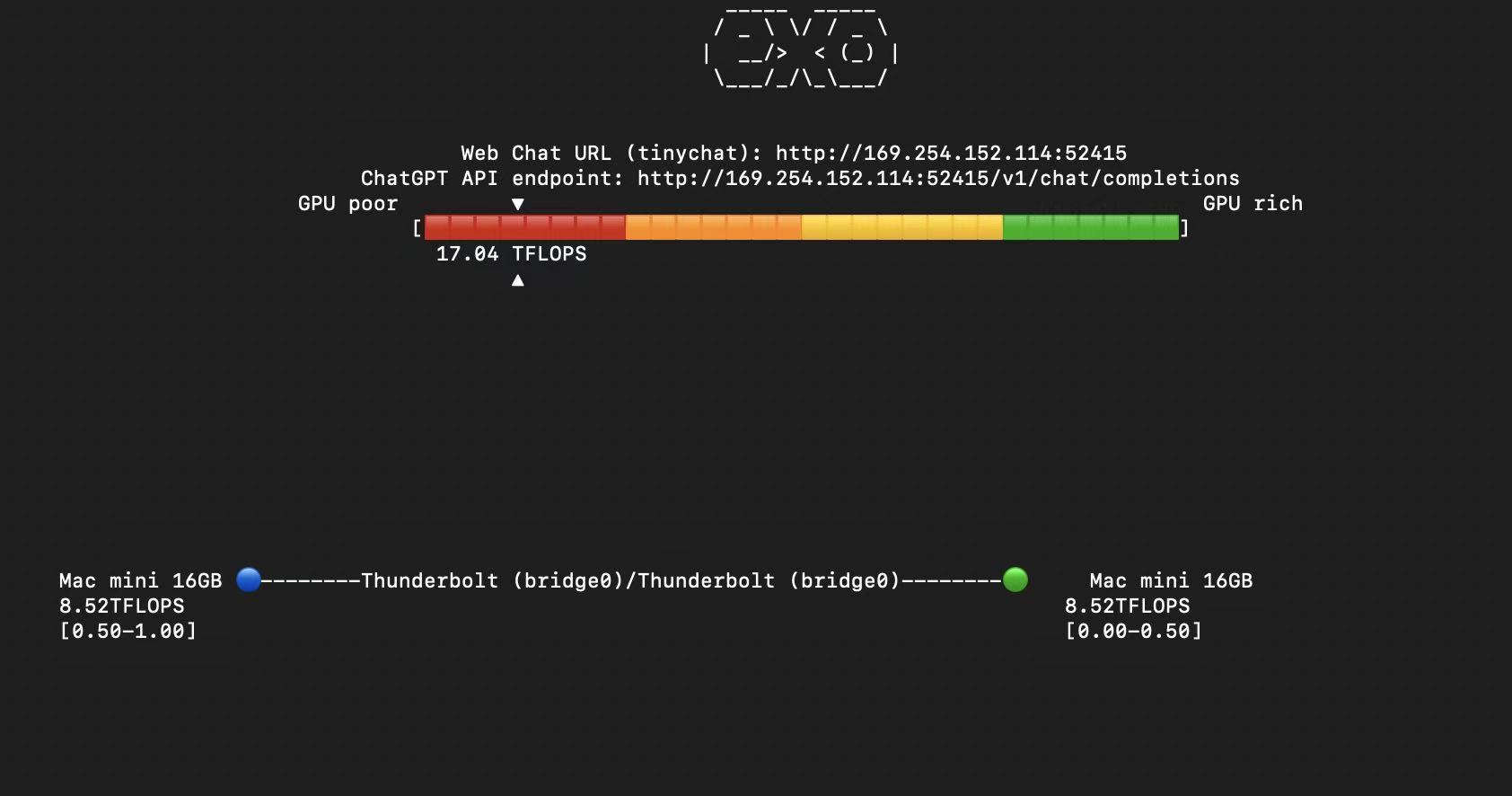
My setup consists of:
- 2 Mac minis with 16GB unified memory each
- Connected via Thunderbolt 5 cable (claimed 120Gbps transfer rate)
- Using opensource libraries ’exo’ and ‘ray’ for cluster management via thunderbolt bridge
- Static IP addresses for stable thunderbolt connections
Experimental Results
Experiment 1: Small Model (LLaMA-3.2 3B)
- Easily fits within 16GB unified memory
Experiment 2: Medium Model (DeepSeek-R1 7B, FP16)
- Slightly too large for single machine
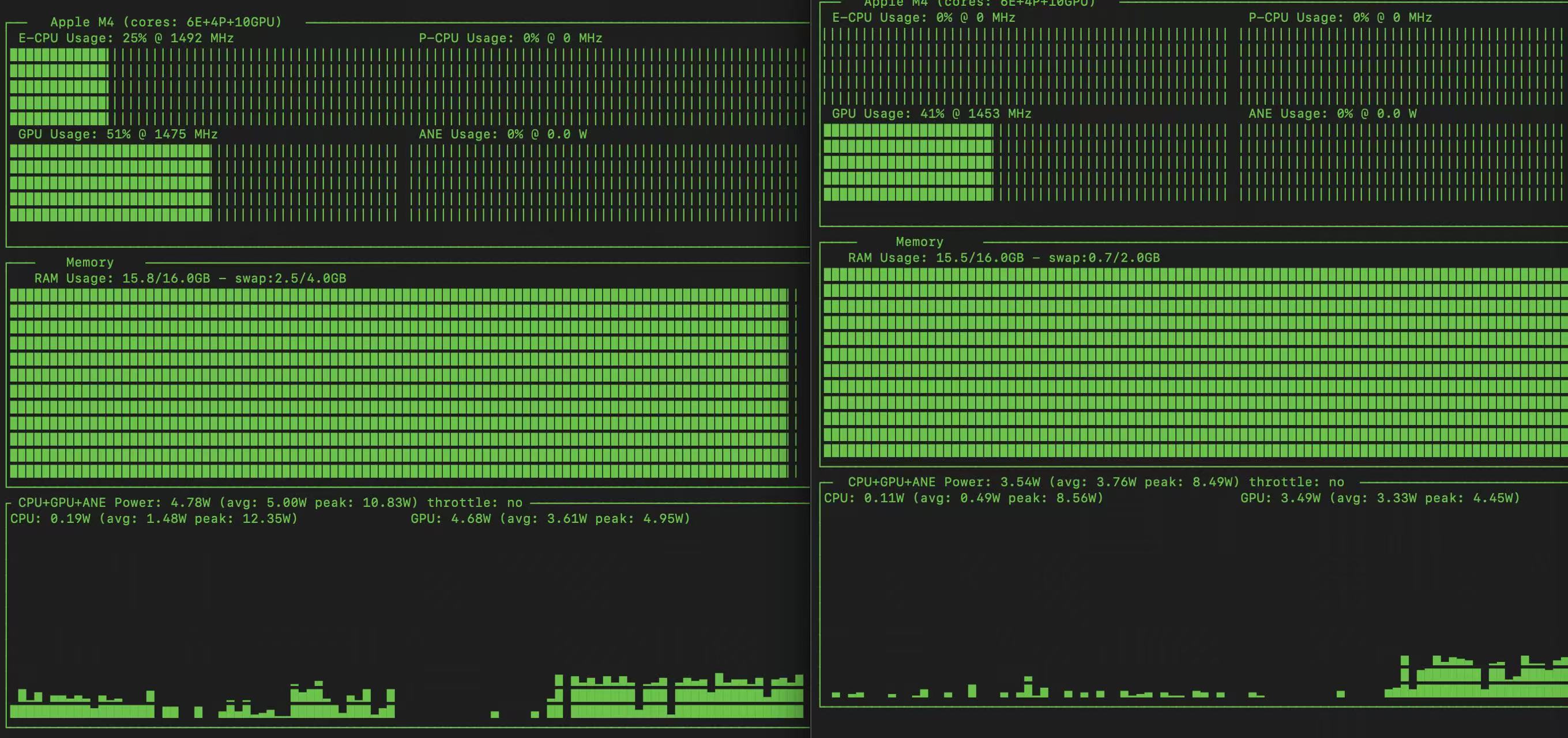
- GPU utilization ~50% on both machines
- Significant overhead from data transfer
Experiment 3: Large Model (Qwen 32B, 4-bit quantized)
- ~22GB model size
- Memory exhaustion led to exo server crash
- Even with 32GB total unified memory, system overhead makes stable operation challenging
, we can see the GPU usage is around 50% for both machine, which is a waste of the GPU.
The overhead of the data transfer leads to the low GPU usage.
!
Experiment 3: Large model can’t be loaded in the 16GB unified memory.
Qwen 32B model quantized to 4-bits
After running the model, which is about 22GB, The memory is almost full and GPU usage is low. And the exo server is crashed. In fact even if the unified memory is 32GB in total, the model can’t be loaded pretty well because of the system overhead, and some preservation of the memory is needed.
Conclusion:
- Pipeline parallel is a good strategy to reduce the memory usage.
- The data transfer latency is the key factor that affects the performance.
- The 120Gbps Thunderbolt 5 cable is not enough to transfer the data efficiently.
With 2 machines, each layer is split between them, effectively creating a virtual GPU with double the memory and bandwidth capacity. This approach can potentially process twice the data simultaneously.
To improve GPU utilization, tensor parallelism offers an alternative approach by splitting the model horizontally across machines.
With 2 machines, each layer is split between them, effectively creating a virtual GPU with double the memory and bandwidth capacity. This approach can potentially process twice the data simultaneously.
Currently, no existing tensor parallelism solution exists for Mac mini clusters. Further experimentation in this area is planned for future work.